
Media Albums – Structure Your Celebration
Eventlens gives you full control over how your photos and videos are organized —
from the very first upload to the final memory shared

Excellent reviews
Moments collected
Events created
Media Albums – Structure Your Celebration
Eventlens gives you full control over how your photos and videos are organized —
from the very first upload to the final memory shared


Excellent reviews
Moments collected
Events created
Break the Day Into Moments
From ceremony to the last dance — organize with intention
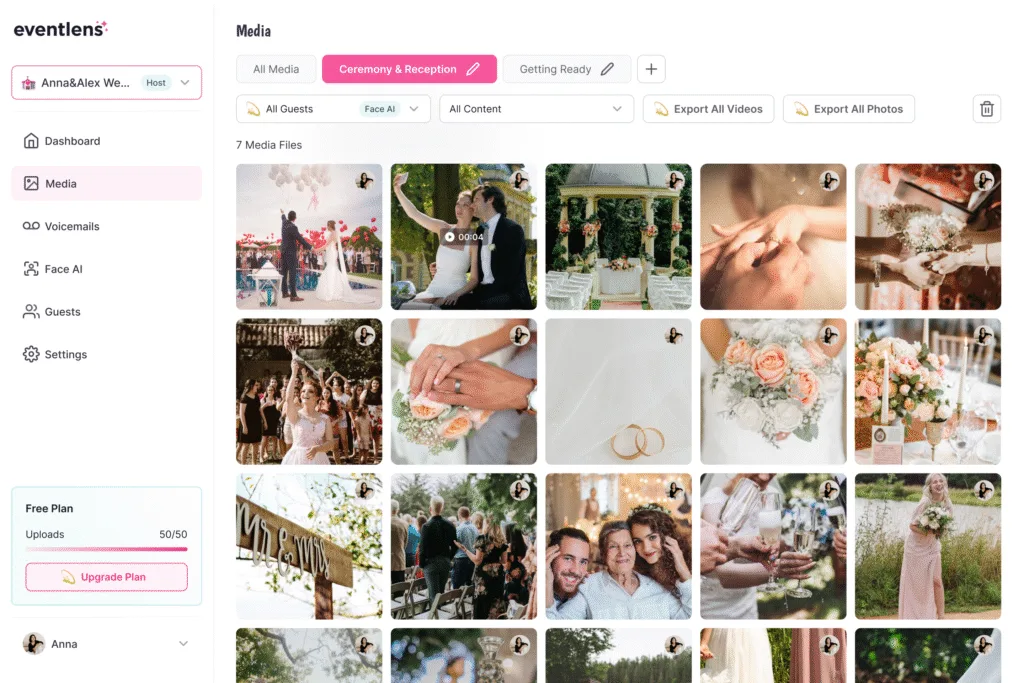
Create separate albums for different parts of your event: Ceremony & Reception, Getting Ready, Group photos etc.
This helps everyone quickly find what they’re looking for, and makes every moment feel special.

Break the Day Into Moments
From ceremony to the last dance — organize with intention
Create separate albums for different parts of your event: Ceremony & Reception, Getting Ready, Group photos etc.
This helps everyone quickly find what they’re looking for, and makes every moment feel special.
Clean, Searchable, and Guest-Friendly
Smart tools for easy organizing, browsing, and sharing.
Inside the Eventlens dashboard you can:
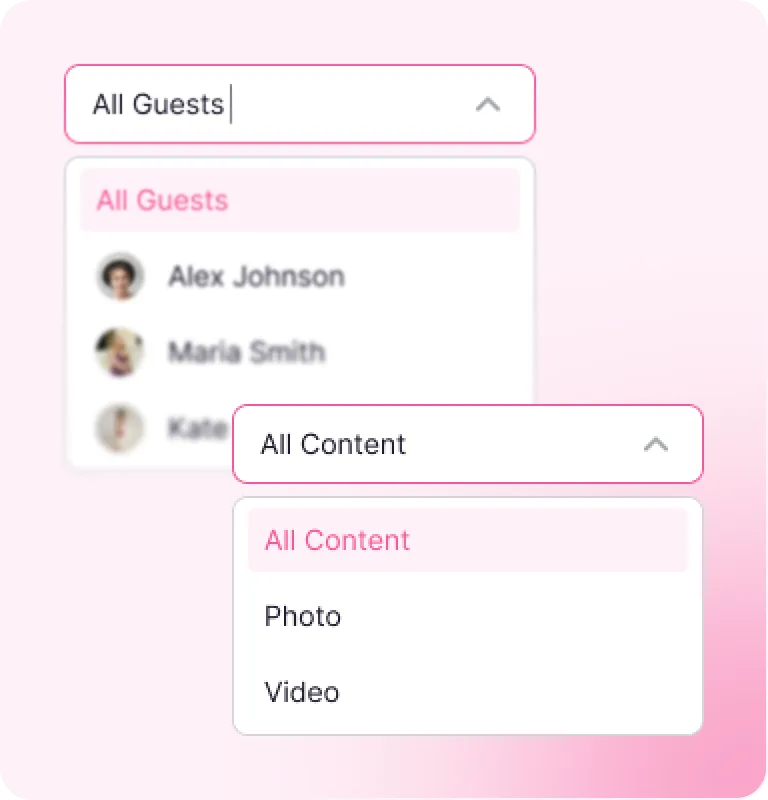
Filter by guest name or content
With smart filters, finding what you need takes seconds — not hours
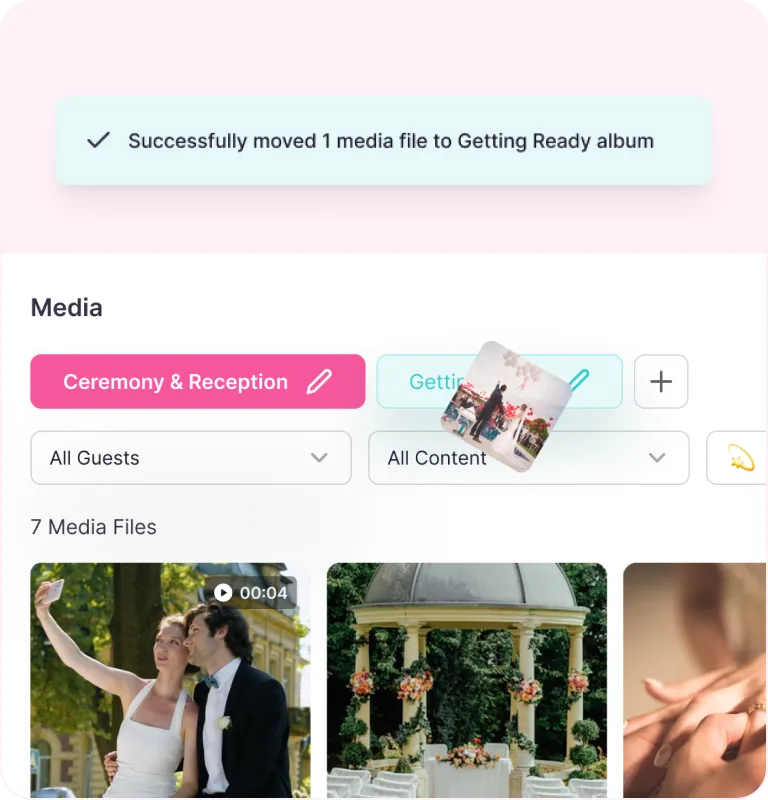
Move media between albums
Instead of mixing everything together, easily sort your uploads into albums.

Upload directly to the right album
Guests choose an album when uploading — so everything lands where it belongs
Clean, Searchable, and Guest-Friendly
Filter by guest name or content
With smart filters, finding what you need takes seconds — not hours
Move media between albums
Instead of mixing everything together, easily sort your uploads into albums.
Upload directly to the right album
Guests choose an album when uploading — so everything lands where it belongs
What our users say
What our users say
4.9/5 out of 623+ Customer reviews
4.9/5 out of 623+ Customer reviews


Great experience. The FaceAI helped us find team moments quickly and made post-event editing a breeze.


Eventlens helped us relive the entire day through our guests’ eyes we now have moments we didn’t even know happened!


Such a fun way to gather memories! Our friends were uploading pics all night.


We got over 400 guest photos in one place and the slideshow during dinner? A total hit!


The best part was how easy it was for guests to share their photos, no app, just scan and upload!


Guests loved the QR code upload even non-techy folks joined in. Simple and effective.
Thomas Prent
Toronto

Great experience. The FaceAI helped us find team moments quickly and made post-event editing a breeze.
London
Eventlens helped us relive the entire day through our guests’ eyes we now have moments we didn’t even know happened!
Frequently Asked Questions
Frequently Asked Questions
Do guests need an app?
No. Guests can simply scan the event QR code or click your shared link to upload photos and videos, no app or account required. It’s fast, simple, and works right from their phone’s browser.
Can I control who uploads photos?
Yes. With Eventlens you decide who can contribute. You can keep your album private and only share the unique event link or QR code with selected guests. If you prefer more control, you can also approve or decline uploads before they appear in the album.
How long will my event stay active?
Your event album stays online for as long as your event is active. This means you and your guests can revisit the photos, videos, and memories anytime, before, during, or after the celebration. For special cases, you can also download all content to keep it forever.
Is there a free version?
Yes. We offer a Free Plan that lets you try Eventlens with limited uploads and features. It’s perfect for smaller gatherings or testing out the platform. You can upgrade anytime to unlock unlimited uploads, advanced controls, and more customization.
Can I use this for corporate events?
Absolutely. Eventlens is not just for weddings or private parties. Many businesses use it for conferences, team events, product launches, and trainings. It’s a simple way to collect media from attendees and share highlights instantly with your team or audience.
Do guests need an app?
No. Guests can simply scan the event QR code or click your shared link to upload photos and videos, no app or account required. It’s fast, simple, and works right from their phone’s browser.
Can I control who uploads photos?
Yes. With Eventlens you decide who can contribute. You can keep your album private and only share the unique event link or QR code with selected guests. If you prefer more control, you can also approve or decline uploads before they appear in the album.
How long will my event stay active?
Your event album stays online for as long as your event is active. This means you and your guests can revisit the photos, videos, and memories anytime, before, during, or after the celebration. For special cases, you can also download all content to keep it forever.
Is there a free version?
Yes. We offer a Free Plan that lets you try Eventlens with limited uploads and features. It’s perfect for smaller gatherings or testing out the platform. You can upgrade anytime to unlock unlimited uploads, advanced controls, and more customization.
Can I use this for corporate events?
Absolutely. Eventlens is not just for weddings or private parties. Many businesses use it for conferences, team events, product launches, and trainings. It’s a simple way to collect media from attendees and share highlights instantly with your team or audience.